This is my first article in a long time and to be honest I never really thought I would find the time or inspiration to write again, but recent events that impacted friends of mine online pushed me to write at least one more piece. With websites being easier than ever to publish online (we’re talking MINUTES), it is getting easier for people with less than stellar business practices to create legitimate looking websites and then sell them to unsuspecting beginners that are looking in to buying their first website or e-commerce business. In this article, I will give you tips on how to perform very basic research that can avoid thousands of dollars in losses, legal fees and hours upon hours of anxiety and heartache from being ripped off, or at the very least, completely misled.
It’s important to note that most online website purchases that go awry are not illegal or necessarily fraudulent. It’s simply a case of the buyer not asking the right questions, or perhaps more precisely, not know what the right questions are in the first place. You wouldn’t buy a house without performing an inspection would you? Or a car without taking it for a test drive? Even buying something as simple as a cantaloupe, you probably have a trick to tell if it’s ready such as thumping it, or pressing the end of it and smelling it, or maybe rolling it down the aisle to see if it rolls straight and true. Whatever your fruit purchasing methods are, the point is you have a vast database of checklists or must-do procedures before you buy anything. Same thing goes for buying a website.
When it comes to buying a website, I actually have 3 simple rules I follow and I recommend to anyone.
- If the seller is boasting “HUGE POTENTIAL” or similar wording as a main selling point, I run away.
- The numbers have to make sense.
- A fair price in the simplest terms in most cases is the average monthly income for the last 3 months x 12.
Everything else in this article is centered around these 3 rules and if you stick to them, you’ll greatly decrease your chances of getting burned. Let’s go over them.
This site has HUGE Potential!
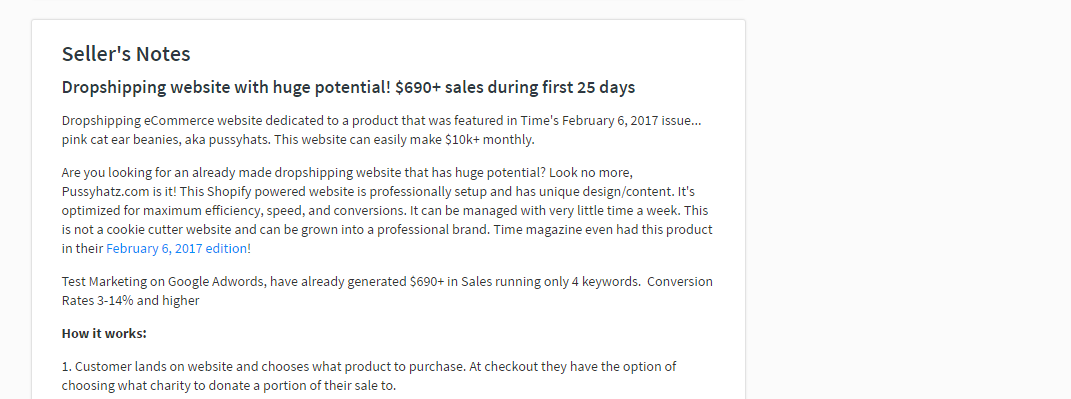
When it comes to web real estate, nothing is more plentiful or as worthless as potential. One of my favorite expressions is that money talks and bullshit walks. When folks are touting potential as a reason to buy a website, you need to keep walking. Classic example:
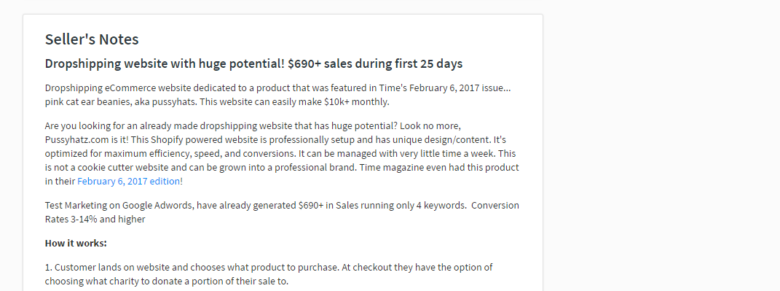
Potential is very subjective and quite frankly is something being sold to you on an emotional level, a gut feeling or maybe the promise of something great to come. Emotional decision making in website purchasing, or any business decision really, will lead to disaster.
When someone is selling a site and they are pushing that it has “high potential”, “untapped niche”, or “proven market” or some other buzzwords without any kind of actual sales information or traffic information, this is a giant red flag. It usually means that the seller has created a templated whitelabel website of some kind in the last month, assigned it to a recently purchased domain name and is looking to dump it for a quick sale. This means the site has no customer base, no SEO optimizations, no traffic and ZERO revenue. Basically you bought a site that probably cost $50 to make and will take you months of work and probably hundreds, if not thousands of dollars of additional development to get going. These types of sites sell for prices all over the map, from $150 to $5000 and beyond, it’s crazy.
You should also be wary of people mentioning that the product or service being sold has been mentioned in Times Magazine or some other sort of publication. If it says something about it being recommended by Doctor Oz, don’t walk… RUN!
Revenue
Most of the time, these template sites will have next to no revenue, or conveniently enough, revenue in the last month or so since the sale became available for purchase. Get proof of all revenue claims by either bank statements, deposit statements, shopping cart reports or affiliate payout screenshots. NEVER just accept revenue claims at face value, get proof. Understand that if the site has JUST started making revenue, no matter what the amount is, assume this is a new site that isn’t making a dollar and won’t without you making a considerable effort to monetize your site.
In the example of a site suddenly making money in the last month, it’s safe to assume that the seller is pumping adword campaigns to drive some initial sales up as fast as possible to get the best price for their site. As soon as you take over, those campaigns will be cut and the site will go to $0 in daily revenue almost overnight. The same goes for a site that relies on ad revenue such as Adsense. It takes tens of thousands of daily visitors to make decent revenue from the online ad market as CPM and CPC rates are minuscule. If the site is suddenly generating hundreds of dollars a month in ad revenue, the seller is likely driving traffic to increase value.
As a general rule for anyone looking for a site that has an established revenue stream, look for a site that has been generating consistent or increasing revenue month to month for the last 6 to 12 months minimum. Get proof and details of all earning claims and if a seller isn’t willing to share that kind of information, move on. Obviously don’t expect the seller to divulge the magic sauce that makes the site a financial success in all cases (it’s usually obvious) but they do need to back up all revenue claims.
Site Age
When you buy a car or a home, what’s the first thing you ask? Hopefully it’s the same thing I ask… how old is it? The same thing goes for purchasing a website, you absolutely need to know how old the site is. And once again, don’t just take the seller’s word for it, find it for yourself. There’s a number of ways to check and see how long a domain has been around, but also to verify how long that site has been running on it. It’s easy to own a domain for 3 years, but only launch a site on it 2 weeks ago.
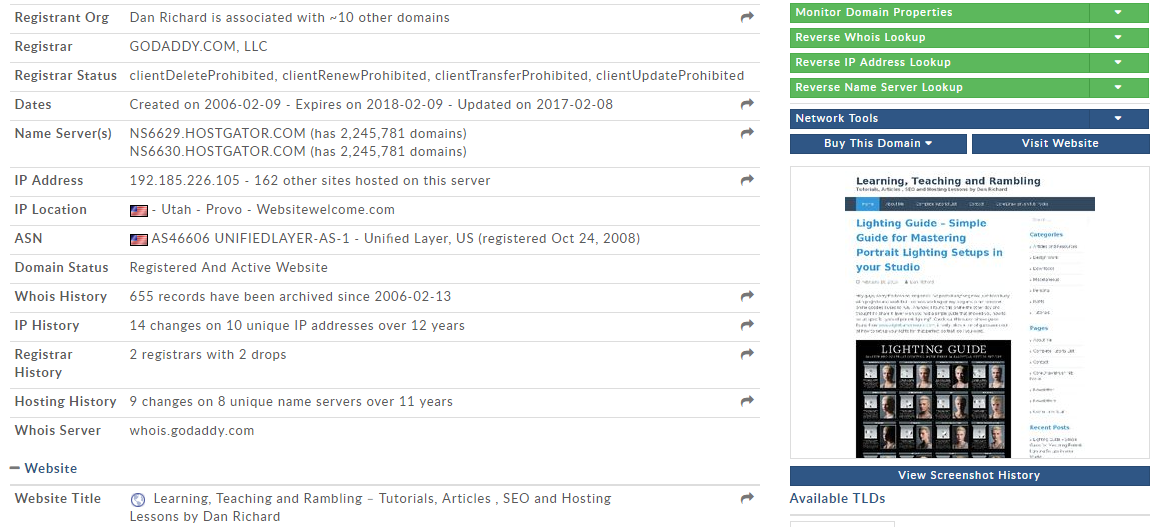
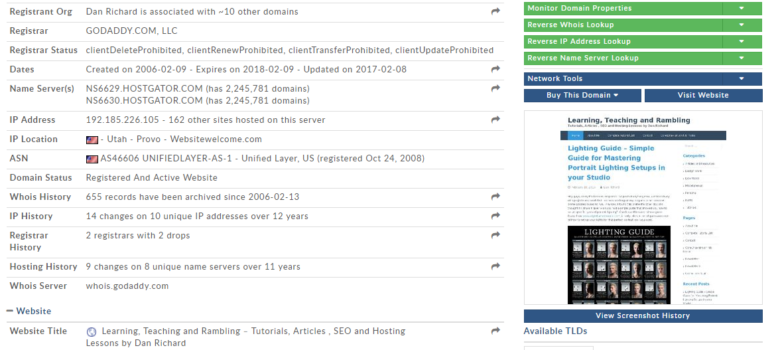
First off, find out how long the domain has been registered, and you can do that at http://www.whois.sc for free, it’s a great site I’ve used for my whois searching for many years. If you run this search for my blog, you can see that danrichard.com has been registered since February 9th 2006. Wow, 11 years already?!
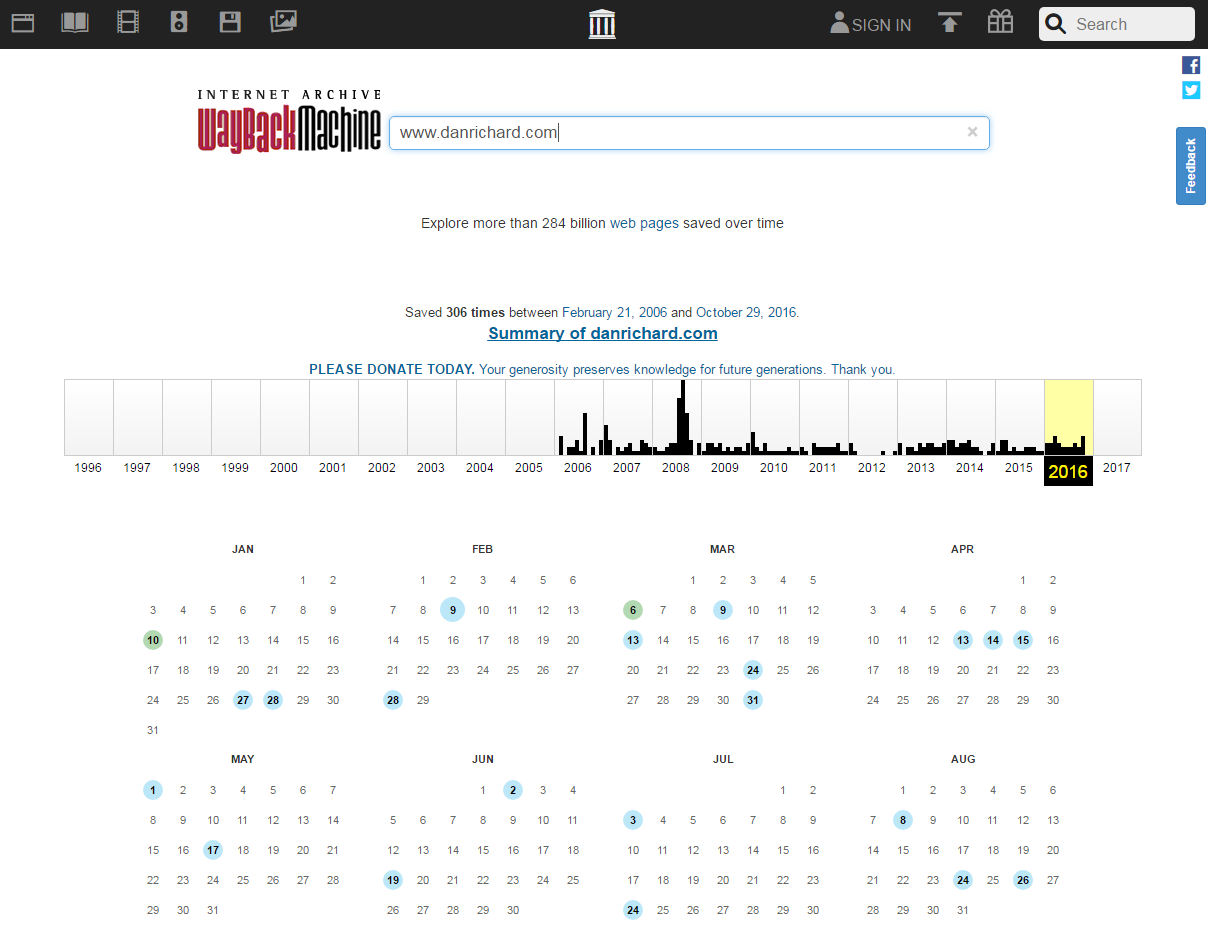
You’ve now established that the site has been registered for several years, but that could just mean that the person owned the domain for years and only recently decided to launch a site on the domain or perhaps they only recently purchased the domain from someone else. So what’s the next step? Find out how long the website has been operating on that domain, and I love to use the Wayback Machine at https://archive.org/web/ to check that out. This will show you just about every major change to that site running on that domain since the domain was registered. You’ll see a lot of broken images but it still gives you a very good idea of what that site you are thinking of buying looked like a month ago, 5 months ago or 5 years ago. If the seller is claiming the site has been running for 6 months but never monetized so it has “huge potential”, this is a good way to check out how long the site has actually been around in its present form. Here’s how it looks when looking at my blog’s archive:
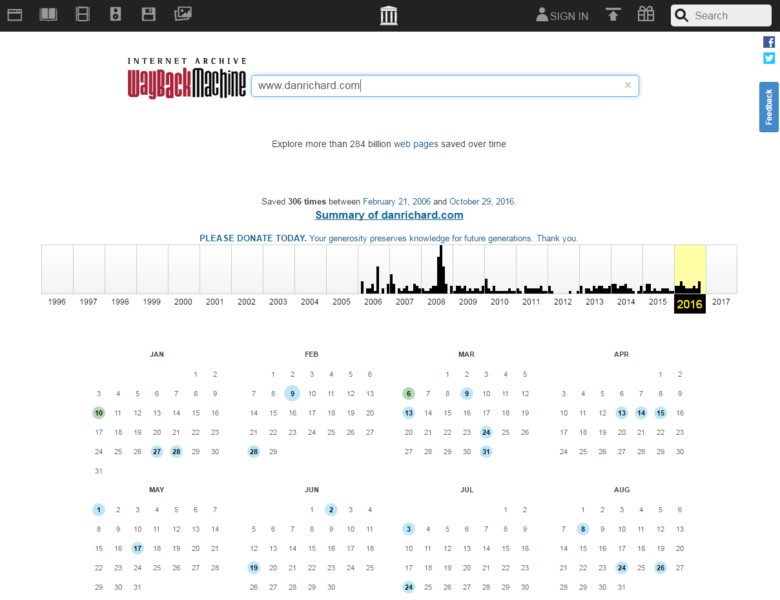
Here’s how my site looked back in 2006 when we first started… awww!

Traffic
Similar to revenue, traffic claims must all be proven, and again can be misleading. First off, if a site is being sold claiming it has established traffic of any kind, do not accept any other source of proof other than Google Analytics. Server logs can be tampered with and screenshots can be from anything, so the only acceptable proof should be GA. Again, if the user gives a seemingly valid excuse for the site not running Google Analytics or it happens to be broken, big red flag. A website seller with good intentions would make absolutely sure that GA was running properly on their site. If you’re seriously considering purchasing a site, create a Gmail account and ask the owner to add your Google account as read only to the site’s Google Analytics profile. You will then be able to access the GA account for that site for yourself to analyze the traffic.
Again much like the revenue, check and see if traffic has been steady or growing for the last 6 to 12 months. If the site is brand new yet has traffic pumping in, the seller is probably purchasing traffic to boost the value of the site. Again, if you purchase the site, those campaigns will stop and your traffic will plummet back to nearly zero. Use GA to look at where the traffic is coming from, referrers and geographical breakdown. If the bulk of the traffic is coming from just a few key sites (and they are probably irrelevant to the topic of the site being sold) or 70% of your traffic is from India, there’s a VERY good chance the traffic is purchased trash traffic.
Costs
DO NOT FORGET COSTS! Websites cost money to run so along with those beautiful revenue reports and traffic reports, do not forget to get full cost breakdowns. Hosting, ad costs, traffic buying, affiliate payouts, shipping or processing costs, vendor payouts, licensing costs, software licensing etc. Make sure you account for every dollar! $2000 in monthly revenue doesn’t looks as impressive when you realize it required $1500 in Adwords to get that.
Do the numbers make sense?
Don’t be so overwhelmed by the fact that this is a website that you forget some very common sense and logical business decision making. Check and make sure the math adds up.
Is the seller claiming thousands in monthly revenue but selling the site for $1000 or some other low asking price that makes no sense? Why sell a site that makes $5000 a month for $2000 when the seller could probably just leave it on autopilot or hire someone off-shore to run it and make a profit with next to no effort? Red flags… red flags EVERYWHERE!
Generating online revenue and traffic takes effort and time, it is not overnight for a new site unless someone wants to flip a site as quickly as possible for the best possible price. If a site is new, then expect it to take a long time to generate revenue and traffic, there are no shortcuts and the price should reflect that. If a site that was established a month ago is bringing in 25,000 visitors a day and making $150 a day out the gate, that just doesn’t make sense. The only exception to this would be if the site was launched by a company that has a massive network of other sites that were leveraged to pump traffic to the new property, and if that’s the case, what happens to that support after you buy it? The most likely answer is you can kiss it goodbye.
Another expression I like… value perceived is value achieved. If the seller can convince you the site is worth a fortune, you’ll pay a fortune, easy as that. Be very wary of sellers temporarily launching heavy ad and/or traffic campaigns to boost up a site’s KPIs to get the biggest price possible.
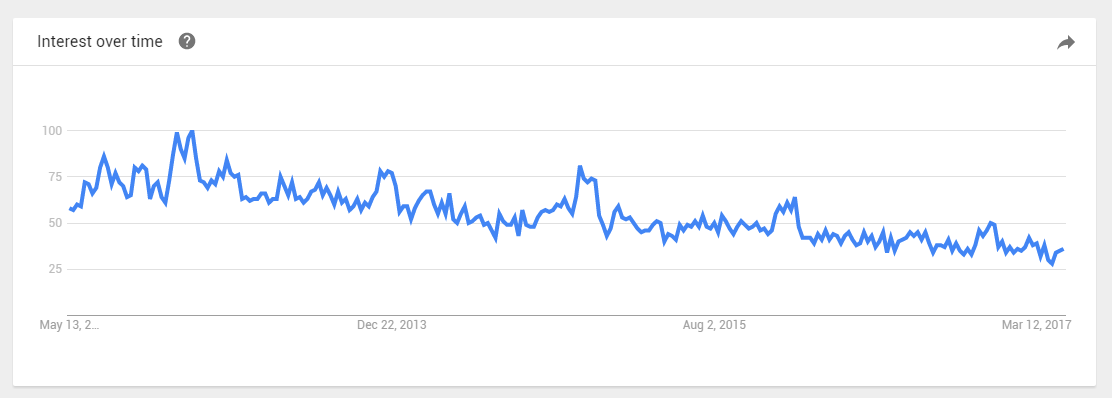
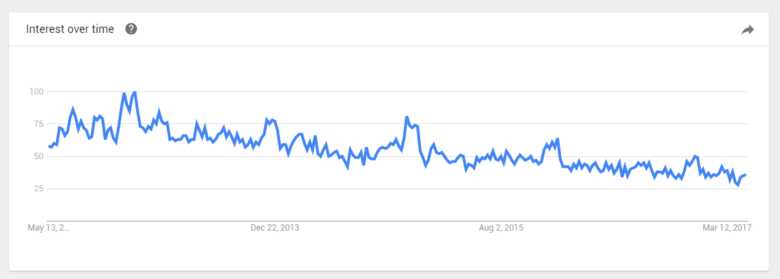
For older sites, check out as much data as possible and look for seasonality and other factors that can influence revenue. Run a trend report on the niche and see if it’s steady or in decline. A good example would be phone cases… several years ago, you could make a fortune selling phone cases and accessories online and drop-shipping to customers. Dollarama stores, the Wish app and Amazon cornered and killed that market and it’s almost non-existent for independents now. How many bought those sites without knowing the decline and paid a fortune for a business that became worthless a year later. Here’s a simple trend report from Google trends on cell phone cases:
Check the numbers and make sure everything makes sense. If you’re not sure, either back out or get professional help from a qualified web analyst.
What is a fair price for a website?
It is really hard to give you a hard-coded recipe for the proper asking price for a website, but as a general acceptable rule, you want to start off with a price that is somewhere around the monthly average net revenue of the last 3 months, multiplied by 12. Depending on cost of sales, some folks will also use gross revenue, but I would recommend being very careful if COS is more than 20% of gross revenue.
So if a site made $1500 in January, $1300 in February and $1600 in March, you would do the following:
((1500 + 1300 + 1600) / 3) * 12 = 17,600
So expect to be in the $17,600 range for this site. Previous performance is mostly irrelevant so that’s why you want to stick to the last 3 months. This works in favor for both the seller or the buyer… if the site is increasing in revenue month to month, then the seller is getting a better price whereas if the site is on a downward trend, you’re not buying the site based on performance that is no longer valid. If the site has been steady for many years, check the seasonality for revenue and traffic to avoid getting jacked on the price. For example, perhaps the site sales are very low in the spring but super high in during the holiday seasons and you’re buying in January. If you use the 3 month rule mentioned above, you’ll be basing your numbers on a very high average. You should normalize the revenue to account for seasonality and adjust accordingly, but remember you need a few years of steady revenue to know if you’re dealing with a growth or loss trend vs seasonality. With a trend, the incline or decline will be consistent, whereas with seasonality you should see inclines and declines that repeat year over year.
I would also highly recommend you use an Escrow service for large transactions. Personally I would go with Escrow for any website purchase over $5000 with 50% released at start of transition and the remaining balance after client sign-off on transition completion.
Final Thoughts
Remember that there are thousands of websites available for purchase every day so there is no need to rush. Be patient and only buy when you’re 100% comfortable (and followed everything in this article) and you’ll virtually eliminate getting ripped off or purchasing a site that did not come even close to your expectations.
You should also consider WHAT you are purchasing in terms of functionality and addressing your business needs. Ask yourself, does the site in question even work the way you want? Is it easy to maintain? Is it cost-effective? Are you paying $5000 to inherit someone else’s problem when you could be spending that same amount for a site completely custom designed from the ground up to your exact specifications?
When in doubt, don’t be afraid to consult and hire a professional in the same fashion as hiring a house inspector when purchasing property. Treat digital real estate the same way, know what you’re getting in to or hire an unbiased professional to give the web property a thorough inspection and provide you with a detailed breakdown to assist you to make an informed decision.
I hope this article will help you make smart business decisions and I invite you to contact me should you need additional advice or would like to me to audit a site for you. You’re also welcomed to leave a comment below with your own feedback or suggestions for smart site shopping.
All the best!
Dan