The IE Ctrl-Q Thumbnail View Trick
Hey guys… I just accidentally found a nifty little trick when using IE 7 that I didn’t know about. There is a keyboard shortcut that quickly allows you to see a thumbnail view of all tabs you have open in your browser, and from there you can click on one you want or close down the ones you don’t need. If you have a ton of tabs open like I do, this is WAY easier than fumbling around with the little tabs at the top.
So, here is the browser open with several tabs on the go:

And this is how it looks when you hit Ctrl-Q:
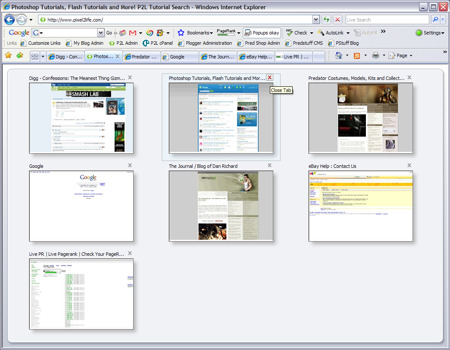
It’s an addicting little trick… kind of like using Windows Key – E to open Windows Explorer instead of doing a right click on the start button or even worse, doing the All Programs > Explore bit…
I also checked FF, Safari and Opera for this little bit of trickery, but it appears only IE has this particular feature. So next time you get in a penii measuring contest over FF vs IE or whatever, remember, you’ve got the Ctrl-Q trick up your sleeve!
Dan
5 thoughts on “The IE Ctrl-Q Thumbnail View Trick”
That’s pretty nifty, would probably use it pretty often if I used IE more. (It’s also the same as clicking the little 4 square icon on the left of the tabs toolbar)
Sorry Dan, you can do that in Firefox… 😛
Not without first installing a plugin you can’t 😛 The point is IE does it by default.
Hey Dan,
That’s what the little button on the faaaar left of all your open tabs does. You can actually see the button on your screenshot — it looks like a little 4 pane window.
Yeah, but we’re talking about keyboard shortcuts 😉