Bypass the Annoying Virus Scanner Warning for MSN Transfers!
Hey all! Because of all the work Nick and I do over MSN, we were constantly getting nagged by MSN any time we would try to transfer anything beyond a .jpg file so he whipped up a quick and handy little bypass utility. It’s a simple .exe file made in C++ that simply returns 0 and exits without anything actually running.
You can download the file by clicking HERE.
Full installation instructions:
1) Download the app: click HERE
2) Extract the .exe to a location of your choice (My Documents).
3) Set the anti-virus in Windows Live Messenger:
– Go to Tools > Options > File Transfer
– Check the Scan files for viruses using option
– Click Browse… and select the DoNothing.exe application you extracted.
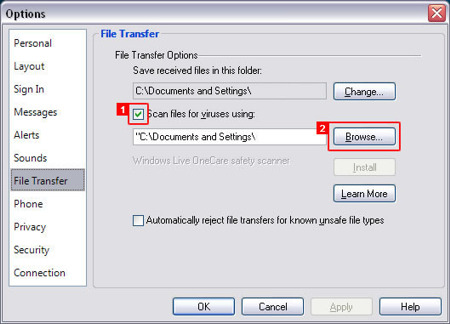
Enjoy!
Dan
5 thoughts on “Bypass the Annoying Virus Scanner Warning for MSN Transfers!”
Hell yeah, I hate that bloody virus scanner thing. And the one it wants you to install just sucks majorly.
Smart lol
Oh cool, 🙂 Thanks for sharing.
awesome!
There has to be any other methods of hook up to the blog without opting-in for the RSS? I don’t know exactly why however I can’t obtain the RSS filled in the viewer while I can read it via my browser.