How to get your HP Scanjet 5300c Scanner Working in Windows Vista!
Introduction
If you’re reading this tutorial and are indeed the owner of a Scanjet 5300c or other 5300 model, and you recently upgraded to Windows Vista, then you are probably one pissed off individual.? Like me, you went to the HP website to download the Vista drivers and you were greeted by this PATHETIC message:
We are sorry to inform you that there will be no Windows Vista support available for your HP product. Therefore your product will not work with Windows Vista.
The majority of HP products not supported in Windows Vista are beyond seven years old. If you are using the Windows Vista operating system on your computer, please consider upgrading to a newer HP product that is supported on Windows Vista.
HP has numerous products on the market that support Windows Vista: http://www.hp.com/united-states/tradein/home_flash.html
I actually had to re-read this, especially since I bought this scanner 4 years ago, not 7. So at this point, I swore an oath that I will NEVER purchase another HP product based on this blatant laziness on the part of HP and trying to shove their clients to buying new products for no reason. I was fuming for days after this, I seriously couldn’t believe they would essentially crap on their clients like this. I can understand phasing out very old products, but my 5300c was purchased at a retail store in 2003 or 2004.
So, I started fooling around with the settings and guess what? I found out how a simply adjustment that takes 5 seconds will get your 5300c scanner to work fine with your HP Precision Scan Software! Ready to take back control of your perfectly good HP scanner? Here’s how you do it:
Installing the Drivers and Software
Step 1 – Visit the HP website driver page for the 5300c or whichever 5300 series Scanjet you have. Here’s the driver page for HP Scanjet 5300c.
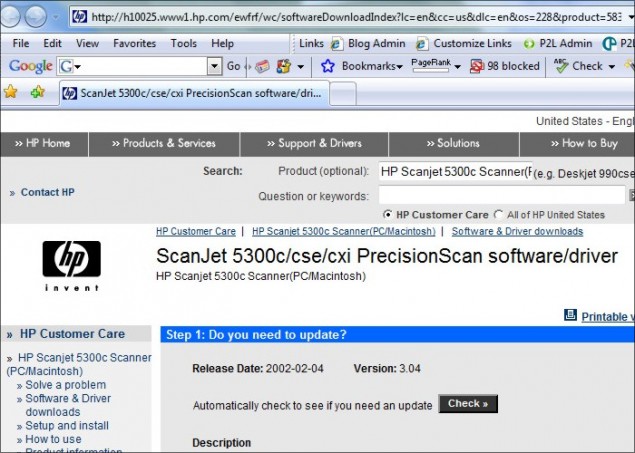
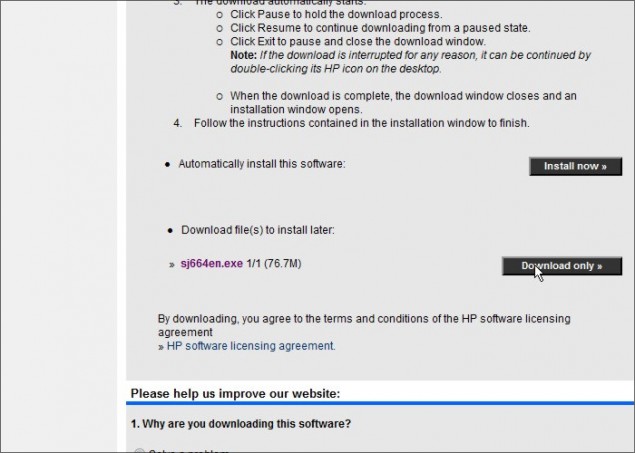
Step 2 – Ignore the “Check for automatic updates” section at the top of the page and scroll down to the bottom and click on the “Download Only” button to save the sj664en.exe file to your hard-drive.
Step 3 – Run the application to install the Precision Scan software and drivers and then connect your Scanjet to your PC. You should now see the Precision Scan software in your program list like this:
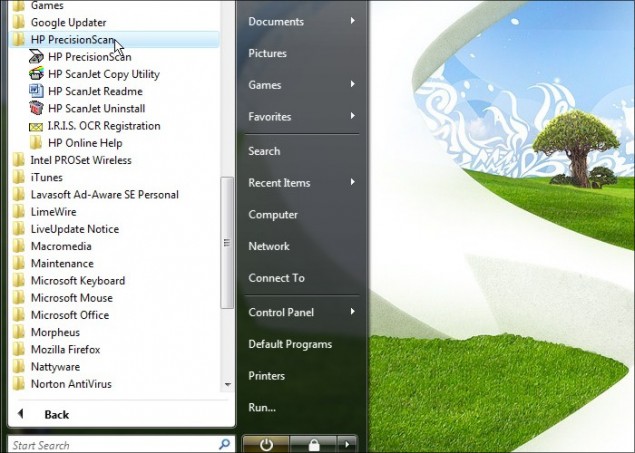
You’ve successfully install the software and drivers! Time to tweak the settings to get your scanner working again.
Software Settings
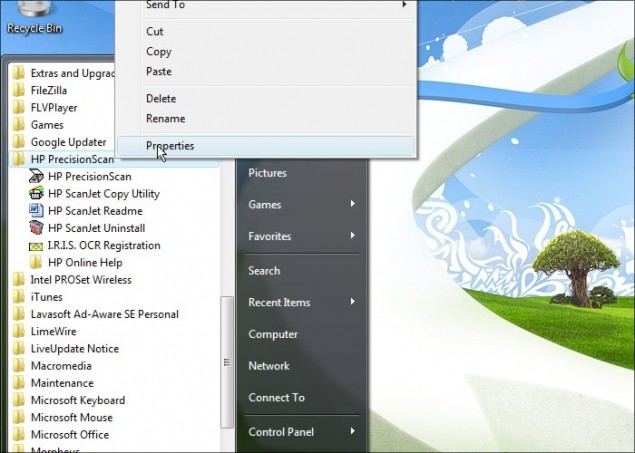
Step 1 – You’re not going to believe just how simple and easy this tweak is to get your scanner working again, and quite frankly HO should be ashamed of themselves.? With your programs open in the Start Menu in the previous step, right click on the HP Precision Scan folder and click on Properties.
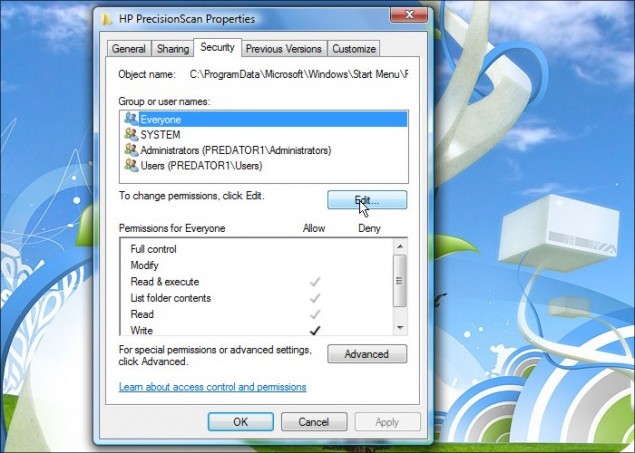
Step 2 – Once the Properties window opens, click on the Security tab and you’ll notice that All Users doesn’t have “Full Control” access to the application. Click on the Edit button to fix the permissions.
Step 3 – In the Edit window, click on each user and click on the Allow check-box for Full Control.? It’s important to ensure that every user type has full control.
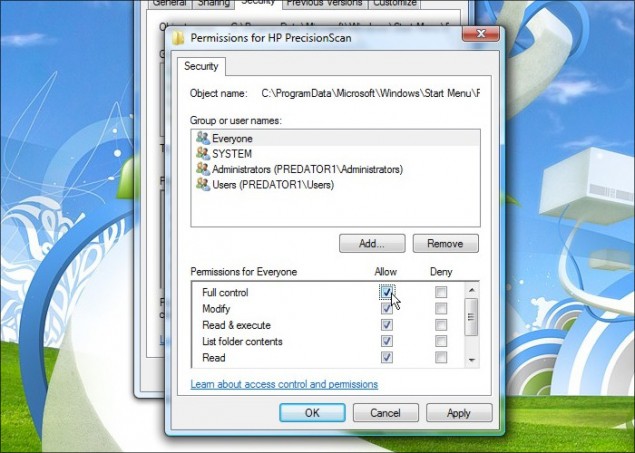
After you’ve assigned full control access permissions to all users, click Apply and OK to return to the Properties window:
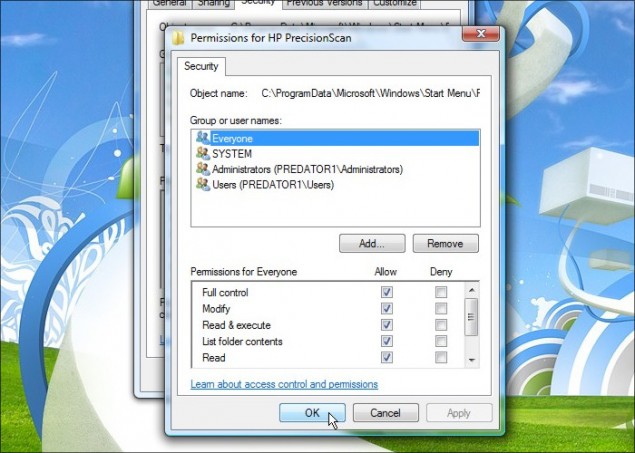
Then click OK in the main Properties window:
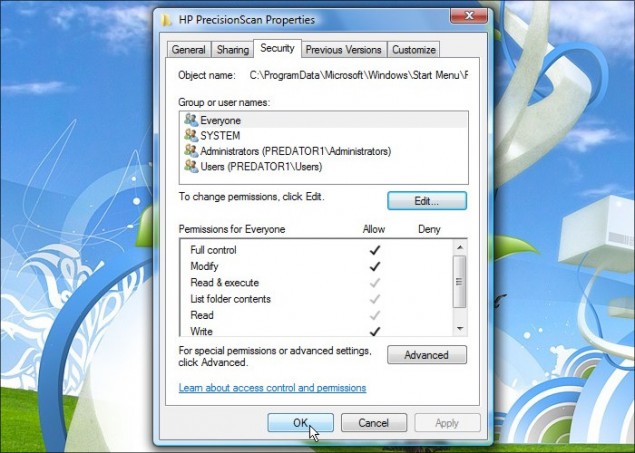
Step 4 – Now your new permissions SHOULD apply to all the applications in that HP Precision Scan folder, but you should repeat all the steps above to ensure that all the listed applications are all set to Full Control for all users.
After that, you’re in business!
It’s Scan Time!
Now click on the HP Precision Scan utility and the scanning utility will come up.? Click to scan and you will no longer get the “No scanner connected” error that you were getting before if you were trying to use the XP drivers without tweaking the security settings as described in this tutorial.
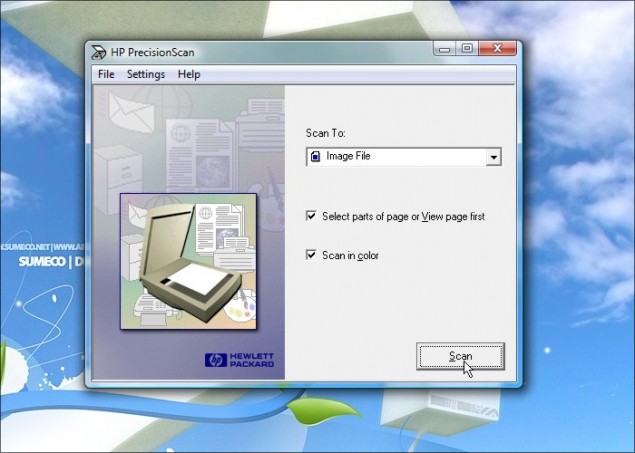
SUCCESS!
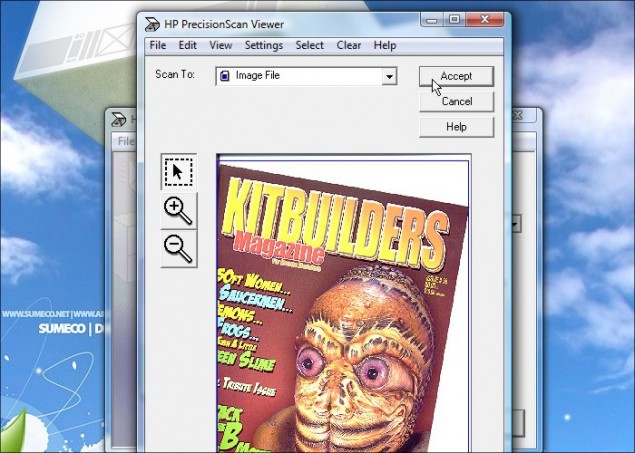
I think Canon just won themselves a new customer next time I go scanner shopping.
Thanks!
Dan
15 thoughts on “How to get your HP Scanjet 5300c Scanner Working in Windows Vista!”
Tried your HP 5300c under VISTA, doesnt work.
1st hp screen and 2nd hp screen comes up then a error box saying 5300c in use already but it is not. No matter what you click in error box program ends.
My 5300c is on usb bus.
OK try setting the properties for your precision scan shortcut to run as administrator as well. If you go to the comment section where I published the tutorial (Go to the tutorial and click comments at the top left right next to the avatar icon) and scroll down to the post by 000000000000… he had the same issue.
Good luck!
Dan
Tried your solution.
My 5300C will copy, but not scan. Obviuosly it does scan when it copies and prints, but it will not JUST scan. I just get a message something about application in use. I have totaly uninstalled the drivers and the scanner several times,rebotted, etc. and re-downloaded and tried over and over, with the same results. This is a brand new Dell running Vista, of course. Has anybody had simular experience and more importantly, any solution?
I am also finding that the solution does not work. I have the same problem as Jack.
hi
just tried the same solution, wasn’t working, till I did the ‘administrator thing’:
on the icon>right click > run as administrator > and ……..it WORKS !!!!
Your solution did not work for me either. Nor did Stan’s solution to run as administrator. If I click on the scanner icon, I get a message saying that the program is in use by another application, but there are no other applications loaded. If I try to open as administrator, it says it can’t find the scanner. Any other ideas?
on win7 he at all doesn’t install the driver on the device and displays it as the device without the driver…. ((
what i found worked to override the msg that the program was being used by something else was to go into properties and under the Compatability tab you have to check that you are running this as the ADMINISTRATOR. That worked and I can now scan from my scanner with Windows XP
Thank you Dan Richard. Your solution worked fine for me although like Jenny I had to tick the Administrator box in the compatibility tab to overcome the ‘scanner in use by other programme’ message. This is a moral victory over HP indifference to their customers. This could affect my future purchasing decisions having been a loyal HP customer for some 20 years. Thanks again for taking the time to post the fix.
Thanks to Dan Richard. It worked for me! And, this will also effect my purchasing decisions in the future! 😉
Didn’t work for me, even when I checked run as administrator.
Running win 7 (forced upgrade) managed to successfully install the newest driver. Followed all of the steps given. Gave permission for everyone to do everything. Both on the shortcut tab and the properties tab in the control panel. ticked the run as administrator tab and the compatibility tab for xp. Computer still won’t find the scanner. Oh well. Will play with it a little more. If it doesn’t work. I guess I’ll get a new scanner. NOT an HP!
doesnt work on win 7
It will likely work on windows 7 and windows 10 but with the caveat that you are running 32 bit versions of these operating systems. The device driver is likely a 32 bit only driver. It is also likely the precision scan utility will be broken on later windows. Note that Microsoft released a scan applet so if you can get it to show as a scanner on 10 it should work with that applet. There is also a real 64 bit driver included for this in the commercial program VueScan which costs $50.
Howdy, trying to get my old scanner working on Windows 10. Can you remind me do I need a power cable for the scanner or is it powered via the usb?
Thanks