Product Installation Unsuccessful Please Reinstall Error 24 – Corel Photo Paint, CorelDraw etc dead June 1st 2010!
Nothing like settling down to get some work done in Corel and the stupid thing won't start suddenly and you're greeted with this charming error message:
Product Installation Unsuccessful Please Reinstall Error 24
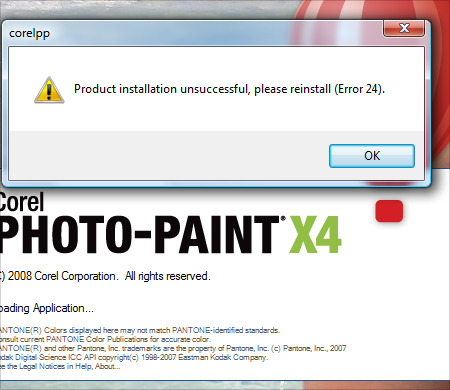
This is a problem we are all experiencing with the date change to June 1st, 2010 and pretty much everyone seems to be experiencing it and Corel is working on a solution as of right now. The only solution for now is to set your PC clock to February (don't change the date or year), run the program to start it up, then change your date back. There is a huge thread on this issue on the Corel forums and they have confirmed this is a program issue and they are working on a patch right now. Gerard Metrailler says to keep an eye on the blogs for the patch when it's released ASAP.
I'll post an update as soon as the patch is released.
Take care!
Dan
UPDATE! Looks like if you have a demo version (which is what I have direct from Corel) or a naughty pirated version, you're SOL. The issue doesn't seem to exist "apparently" for folks that have the regular retail edition. You can read the official post HERE. Looks like I'll be calling Corel tomorrow!
UPDATE 2! There is a patched dr14.dta floating around on the net that fixes the issue by replacing the old one on your system, however all known download links are no longer functional. Please contact me if you have it (select contact the webmaster from the dropdown on the contact page)!
UPDATE 3 – Another solution!
Hey guys… ok here's a little something I just found that allows you to run an application under any date and time you specify but WITHOUT changing your actual system date. It's called RunAsDate and it's free… unfortunately it will only run on 32 bit Windows versions so I can't use it myself as I am on 64bit Vista, but looks like a neat little app that won't mess with your system's actual date. Check it out and download it at http://www.nirsoft.net/utils/run_as_date.html
UPDATE 4 – FINAL FIX!
Thanks to everyone that has posted comments and links to the patch! You can find it here: *link removed*
Simply overwrite the old one in C:\Documents and Settings\All Users\Application Data\Corel\CorelDRAW Graphics Suite X4 or wherever your "All Users" is located. In vista and Windows 7 it will be in C:\Users\All Users\Corel\CorelDRAW Graphics Suite X4
NOTE – If you do not see the "All Users" folder, it's because it's a hidden folder and you have your Windows Explorer set to hide hidden files and folders. You can change that setting by going to Tools > Folder Options > View and then click on Show hidden files and folders. Hit OK and you're good to go!
UPDATE 5 – For those of you using this fix and you have a legit version of Corel, you should still contact Corel directly to report the issue. I just called them and they confirmed issues with buyers that purchased from legitimate big box locations, so this is a serious problem. So please contact Corel directly if you have bought a real copy and you are having this issue, it's important. For anyone that has a stolen/warez copy, come on guys… help support the programmers that made this product and pony up for a legit version or haggle Corel for a NFR copy!
UPDATE 6 – Guys, just finished speaking with Corel about what's happening with my eval copy and the issue in general. Please read my new post by clicking HERE. Please don't post links to the dta file in the comments as it's no longer needed… Corel will help anyone that is having the "error 24" issue and has proof of purchase for the software. Just call them up and they will help you.
96 thoughts on “Product Installation Unsuccessful Please Reinstall Error 24 – Corel Photo Paint, CorelDraw etc dead June 1st 2010!”
Great advice for the work around, thank you so much. It was a simple idea that i should have thought of but i was too flustered with the idea that corel was not working that i just looked for an answer rather than trying one to begin with.
Great advice and nice looking site. well done mate!
ill add you to my favourites.
Hello.
There is a quick fix for this problem.
1. Download dr14.dta from *link removed*
2. Go to the folder C:\Documents and Settings\All Users\Application Data\Corel\CorelDRAW Graphics Suite X4
3. Replace existing dr14.dta with new file
4. Finished. You r Corel will work again
Thank you working. This method working for me Thank You
1. Download this file dr14.dta
https://app.box.com/s/3j1u5wyol85v9alqlqi3a54przhu5o9k
2. Copy and past
Plz re upload the rapidshare link plzzzzzzzzzzzzzzz
Hi Rama, i need the rapidshare link, can u re upload. Love you.
Hi. There is another link, first one is already consumed
*link removed*
thank you so much Dan. God bless you
Hi Rama, tnk u. take care
Hi there,
I was having the same issue, found this via Google, downloaded Rama’s file, Corel works perfectly again.
Many MANY thanks to you, very much appreciated.
Great idea on the date reset. I’ve tried this and it works. I need a better fix. I am using Windows 7 and can’t locate the dr14.dta file. Google desktop can’t find it for me either. I’ve downloaded the file from the link above. Where should this be copied on Windows 7?
Thanks for your help.
Hi there Mike.
I too am using Windows 7, you just need to alter the path slightly to go with the Windows 7 file structure.
The dr14.dta file can be found under
C:\Users\All Users\Corel\CorelDRAW Graphics Suite X4
for Windows 7 and Windows Vista.
Hope this helps,
works fine here 🙂
Hi Jeff,
Thanks for your response. I don’t have a “all users” folder inside “users”. I’ve shown hidden files just in case, but its not there.
I’ve found Corel Draw at
C:\Program files\Corel\CorelDRAW Graphics Suite X4
but couldn’t find dr14.dta. I tried just putting the new file in the parent directory but this din’t work. Is there a subdirectory I should put this in?
Thanks again.
Mike
I’m afraid I can be of no further use then.
I literally copied and pasted the link from my own Windows Explorer into my post.
As far as I’m aware, inside “users” all versions of Windows have “all users” so maybe something is amiss.
All I can say is to check on your Windows Drive\users again.
You should find several usernames in there, including Administrator, All Users, Default, Default User, Public, and your own username.
If you don’t see these, maybe you’ve somehow ended up in the wrong place.
Again, just go to “Computer” “C” “users” “All Users”
Now that I come to look again, “All Users” does have a padlock beside it, so you’d have to enable view system files as well. That must be it, you need to make system files visible.
Hope this helps.
Mike, the All Users is hidden in Users folder. Make windows to show all files and system files in folder options.
Sorry for my english
Funziona!!!
grazie RAMA!! 🙂
I Love You, Rama 🙂
Hey Mike, open C: organize – folder and search options – view –
select show hidden files and folders – apply.
then, C:/ program data/ corel/ suite 4/ dr14….
hope help you
Can Anybody Share This file ?
None of the links work…can someone please re upload?
Thx in advance.
I’m probably being very dense but even with hidden files shown, and logged in as administrator, I can’t see “all users”.
I can see the individual user folders, a hidden “default” folder, but not the “all users” folder.
I’ll keep working at it because I don’t relish resetting the clock every time I start up CorelDraw.
Perhaps Corel will come up with a patch that works for me too!
Your comments and help were very much appreciated.
please upload a file on ftp
please upload this file again
Please upload the dr14 file again please
If someone could send me the file, I can host it here on the site. Email it to me at dan at pixel2life.com 🙂
All links to this file are wasted. Could you please uploaded to mediafire.com so that it would last longer. Thank you.
PS: I’m another one living in 2008 thanks to Corel. At least that’s the date of my PC now.
Hey guys, check out the latest Update 3 I just posted.. it’s a little app that lets you run applications at any date and time you specify without changing your REAL system date settings. I’m still trying to find the dr14.dta file but this should work nicely in the meantime.
Where u are posted ? Give link
as per dan, this works:
http://www.nirsoft.net/utils/run_as_date.html
Please upload file DR14.dta ! All links is broken.
I too would be eternally grateful if either the original poster, or someone who has d/l’d the file, could repost it so that others can acquire a copy of it and help spread it around!
whoever has the file please upload it again! thanks!
Here is new link at mediafire:
*link removed*
*link removed*
Thank you very much Rama!
Now to try to help, here is another link:
*link removed*
here it is
*link removed*
Is there a .dta file for WordPerfect X4 only? The Corel Draw .dta file doesn’t solve it. Thanks for the help.
Morelinks
*link removed*
Another Link with the .dta file
This fixed my problem
*link removed*
Need a Patch for WPO14.DTA For WordPerfect X4
thanks you saved my life!!!!!
great man and thank u
Thanks a lot all of you guise.
So you were using the demo version after the expiry date, presumably with a serial number from a keygen you found on the internet?……..
Now you are helping everyone else who has a similar illegal copy continue running theirs…
Morals, where’d they go eh???
Be careful… some of the DR14.dta files here will actually put you back to “evaulation version”
Cynic – Nope, I was given a full CD of a non-retail version from Corel directly when I called asking for a copy for Eval (I do a lot of promotional work for Corel) and it came with a certificate and serial number. There are also a number of people that bought retail versions from reputable stores that are having this issue and are seriously PISSED that they are suddenly not working just as Corel released X5. Check out the Corel forums, there’s quite a shit storm taking place. I’ll be using this fix until I get a new CD for X5, all morals intact 😉
Great fix: on my Visa machine the dr14.dta file is located in
C:\ProgramData\Corel\CorelDRAW Graphics Suite X4
worked easily!
After sharing the dta thingy in your post, and leaving it live in the comments, I have to wonder if Corel will slide work your way in the future.
>> I’ll be using this fix until I get a new CD for X5
good luck with that
If Corel has any issues with the post, they’re more than welcome to contact me directly, we’re not exactly strangers 🙂 Btw feel free to dig around the blog, I posted a pic of me with the CD when I first received it and I’ll post one when X5 rolls in.. $200 isn’t exactly breaking the bank if I can’t get an NFR from them.
@dan – yup. I bought 2 OEM upgrades from a store online (i won’t say which but they are reputable) And one of my copies had this issue and one did not. So can your generalities Cynic… Macromedia “did the same thing” with Flash 5 (and 6 if I recall) all of the sudden Flash 4 got really buggy then eventually ground to a halt…but 5 was fine. Of course this is all conjecture, and no one will be able to prove this either, SO I’m going to use the above knowing that I paid for software that I should be able to use. I’m out of the Corel Forum canned response war and back at work. If Corel can’t get their copy protection down and legitimate stores are ending up with bunk copies…not my problem.
Thanks junkbox, appreciate the confirmation on what I said. And yes, I remember when Flash did that, I was actually at work when it happened to the company’s edition and I remember posting on the Flashkit forums about it lol!
Either way, I have my nice shiny X4 box on my bookshelf so I don’t really care if people want to pretend otherwise. I’ve been a Corel supporter since day 1 and likely always will be although I do use Photoshop as well now as it has numerous awesome tools that Photopaint doesn’t have yet.
Just read that Corel will be posting another update on their blog tonight or tomorrow regarding this issue. Wonder what they’re going to have to say this time…
First of all thanx.
nice to back at work, legitimates are gettin’ same error
when activation is done via phone.
Our company head IT-administrator are currently trying to solve the issue
with Corel, until then we’ll all have to apply the above solution.
we also have the same problem on Paint Shop Pro X2, anyone knows where to get the PU12.rta
Beamer23
hah… i rawked Cdraw 1 on Win2.1 as well as Disney Animation Studio in DOS. Mum worked for a company that had a decent software library.
YOU FRAKKIN’ ROCK!
Thanks for the heads up dude!
Hi there, I have another copy of the file here:
*link removed*
Also the workaround solution for Corel X3 users.
Thanks~
Hi,
Its working for me also!!!!!!!!!!!!!
Thanks a lot..
Arvind
Running an evaluation copy does sort of imply that you evaluate it then either remove it or buy it. Now yours has time expired you can’t really complain can you.
Seems you might be better known to Corel now as you seem happy to help loads of people who are running illegal copies of the suite to continue doing so. You have a strange concept of morals is all I can say.
And if you care to contact Corel, they will confirm that there are no users of the full retail version bought from a legit source that are having this problem. The so called ‘shit storm’ you mention has disappeared now the cause has be published, all those claiming ‘legit’ copies have gone silent suddenly……
God bless you !
thank a lot man !
it,s working!!
Thank you Dan 🙂
Thanks so much. you made my day..
anyone know maybe a way we can edit the dta file?
dr14.dta works!!! thanx!!!
Please upload file DR14.dta ! All links is broken AGAIN!!
Sorry guys, if you are having a problem with your Corel installation and you have purchased your copy, you need to contact Corel and they will fix it up for you. If you have a NFR copy or eval unit, it has expired. If you’re running a pirated copy, I’m afraid I can’t help you as I support the purchasing of software.
Thanks!
Dan
can’t find a place to Download dr14.dta
*link deleted*
it worked for me, good luck to you
my final thoughts on the matter:
http://coreldraw.com/forums/p/20269/89360.aspx#89360
Thank you Dan, you did the right thing.
No worries Cynic… once it was clear that this was isolated to demo CDs, NFRs, pirated copies and people that were scammed, it was the obvious thing to do. When this all started going down, I figured this was a global issue similar to what happened with Flash several years ago so I was just trying to help people work around it until Corel released a fix. Little did we know what we were getting in to… lol!
*link deleted* sorry guys I have to remove these links as they are infringments on Corel’s property rights.
Hey Dan… really appreciated work you did… nice article post. but the your final update shows that the fix *link removed*… 🙁 🙁
Dear if here is any prob to publish the link here. then pls email me the link please. my email is mohdsaqib786@hotmail.com . I know its really hard for you to take out 1 min to do mail me. But it would be really appreciated.
Thanks in advance
Saqib
Ta ta tinga!!
Dear if here is any problem to publish the link here then please email me the link please my email is fands@virgilio.it
thanks thatn f.
Please, can I have a link of dr14.dta? Thank you
Can someone please email me the “dr14.dta” file? Thank you.
ohurst3@hotmail.com
I need a copy of dr14.dta too. Could someone plesae be kind enough to orward a copy of said file on my email address that is firstvoice@gmail.com. Thanks in advance
Can someone please email me the “dr14.dta” file? Thank you.
kuba@jgora.net
I need a copy of dr14.dta too. Could someone please be kind enough to forward a copy of said file on my email address that is Shickopick@aol.com Thank you so much
You can download the dta file here: It’s packed as RAR so you need to extract it in the directory specified above.
http://bit.ly/aMnYVw
Is their a wpo14.dta file available?
ts77351@gmail.com
I just bought a New Computer (XP) and am trying to reload the X4 software but I can’t find the Serial Number” I can’t remember what I did the first time,,, I got the box, the Disk and the envelope with the code key. where can I get the SN?? HALP!!
I found the compressed (e24fix) rar archive and sent it to “fands” and Mohd Saqib on 7th June.
Since then my entire post to this thread was removed, wtf?
sjueks@gmail.com
Just google “e24fix.rar” and you will find the file and it works 100%.
My thoughts in this are as follows: I have used Corel* since version 2, with the exception of one year my only “use” was to familiarise myself with the product or “self tuition” on using Corel software. I don’t see why I should pay a full commercial licence to have it sitting on my system with occasional personal use while others pay for the same licence and make $$$$ from using it. The same is true of most software. So I use pirate versions.
However, there was one year in the 90’s when I used Corel 5 for commercial gain. At that time I bought the full version, so I do not consider myself a pirate. Software houses need to consider different ‘end usage’ and offer price alternatives and even free versions. Until they do……
Regards.
Sorry, if you use pirated software, you are indeed a pirate regardless of the excuses you make for not paying for it. Would you work for free, for millions of people?
Hey hello,
My CorelPHOTO paint was working with that day fix (changing the date) but it is no longer… What is changed???????
thanks for LINK REMOVED
It is a very good and quick resolving this problem. Works in 100%!! !! !!
Thanks!! !! !!
Yep Says:
“Sorry, if you use pirated software…….blah blah”
Define “use” ?
I don’t actually use it, I review it so I am familiar with it, that is all.
Yep Says:
“Would you work for free, for millions of people?”
Would you pay the same to ‘test drive’ a product as you would to own it?
thanks its worked for me
Pls help me.. I can’t install corel draw x5… Still appear message ” Accessing the resource ///:ProgramData/CorelDRAW%Graphics 20%Suite%Suite..”
thank you
Thanks a lot admin, I changed d date and it worked for me, in happy.