CorelDraw Brush Nib Packs
On this page I offer custom brush packs for CorelDraw and Corel Photopaint users. These are all .NIB packs that are converted from Photoshop brush .ABR packs that I’ve picked up on the net that I thought were very handy or I made them myself. Simply click on the pack you want and unzip to a temp folder on your PC. Open up CorelDraw or Photopaint and in the Brush Settings Docker, use the Nib Settings menu to load the nib shape you want to use.
Extra Goodies:
Want to know how I made these? Read the tutorial I wrote on converting Photoshop brushes to Corel Brush Nibs. If you want to know how to install these, click here!
Need a blank Nib pack for Corel Photopaint? Download a blank here!
The Packs:
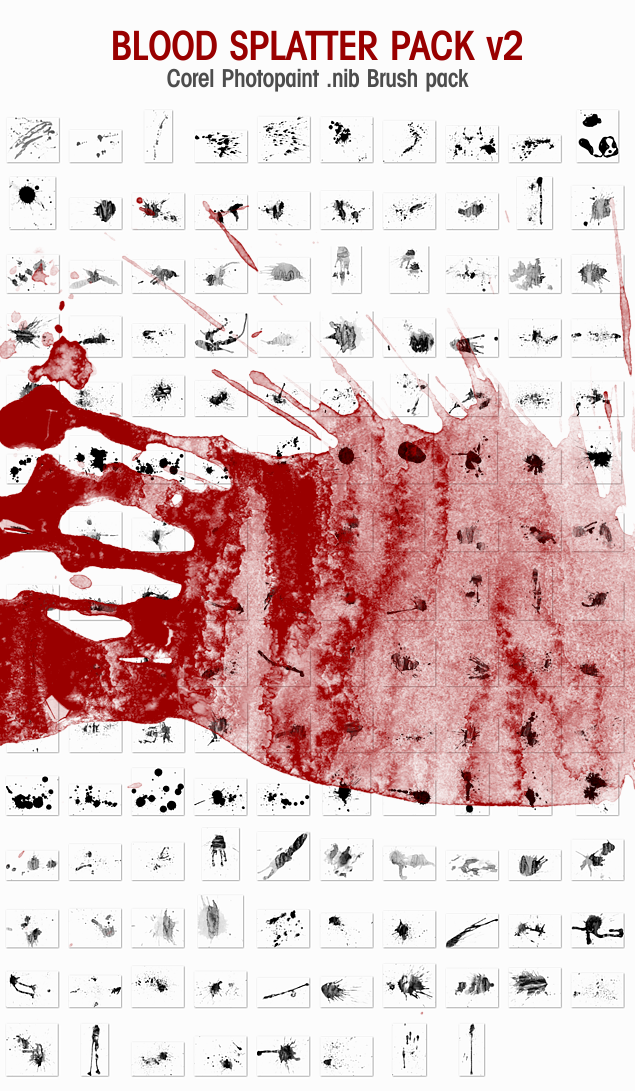
Description: Second generation .nib set of blood splatter brushes generated from several blood ABR files. This is a standalone brushpack and does not contain the default Corel nibs. Click here to download Corel Photopaint .nib Blood Splatter Pack v2. Installation instructions are here.
Download size: 17.7MB
Created: 05-09-2013
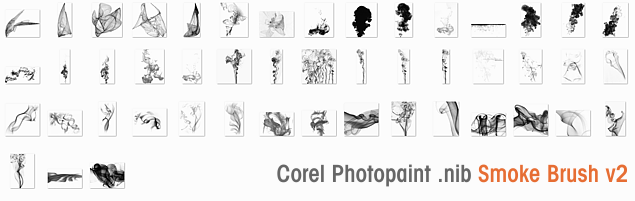
Description: Second generation .nib set of smoke brushes generated from several smoke ABR files. This is a standalone brushpack and does not contain the default Corel nibs. Click here to download Corel Photopaint .nib Smoke Brush Pack v2. Installation instructions are here.
Download size: 5.2MB
Created: 05-08-2013
Can’t figure out how to use these in CorelDraw X3 any suggestions?
These look great and though i do appreciate your work,
I can’t figure out how to use these in Photopaint X3, Draw X3 or Painter X. Please advise on what to do. Thank you.
hi..i cant seem to load the brushes onto corel draw 12…any ideas how?
ok on corel_9 is functional
Um, I can’t load them Corel photo paint 12, help?
works fine, great brushes. Hopefully u will have more in the future 🙂
Just amazing, i tried in my PP and works great. Thanks for sharing! and for yours tutorials
Thanks by TFC Team
Thnx For Sharing…
and… where i can get the ABR for PS of this amazing blood pack???
thanks
awesome. you da man.
..an you sucka’s moaning they dont work READ THE TUTORIAL!
really nice work, thank you
My pleasure 🙂
Dan
thanks
perfect!!!
thanks a lot
Absolutely amazing!!! Many thanks Dan! I’m was unfamiliar with installing new brushes, but your tutorial couldn’t have explained it any simpler. Great work!
My pleasure guys 🙂
thansk man. Jah Bless
Hello I love your nibs but have a problem trying to run them with corel X3 could you help me i did all that the tutorial saids. Thanks
cant use blood brush whit corel x13
I have photopaint x3 and when I tried to convert the .abr brushes I could do everything until I got to the “Create from Contents of Mask” option. Nothing happened. No dialogue box to select brush size, or anything. What am I doing wrong? Help please. Thank you.
WHAT IS THE PASSWORD FOR THE FILES I CAN’T UNZIP THEM WITHOUT IT!
The brush packs are not password protected, no idea why your archive app would ask for one. Works fine in winrar or winzip for me.
Thank’s a lot! These Brushes saved me quite a lot of work!
I can’t find your brush settings docker in coreldrawx4 i’ve lost 1 hour just trying to install it with no sucess if someone can help me would be great thx!!
how to install this brushes in coreldrow
THX a lot! Works fine on X7…
dan num plz
after saw your work i just bought CorelDRAW